Testing webERP
Testing webERP
The webERP test suite consists mostly of functional tests - tests accessing the web interface rather than driving directly the single code components. It is built using PHPUnit version 10.5 and the Symfony DomCrawler component.
The testsuite is run automatically on GitHub to validate every commit and pull request. It is also possible to run tests locally to check that there are no bugs introduced before submitting a pull request.
Understanding test failures on GitHub
To understand the cause of failures from the CI test runs, follow this process:
-
go to the list of executions (aka. “runs”) of the CI tests: https://github.com/timschofield/webERP/actions/workflows/ci.yaml
-
click on the failed run, f.e. https://github.com/timschofield/webERP/actions/runs/17749928838
-
for each run, tests are executed on a matrix of php/db combinations. In this case, tests failed for all combinations, so we pick the 2nd one to start our investigation, as the 1st one is on php 8.5, which is not yet released at the time of execution and thus experimental: https://github.com/timschofield/webERP/actions/runs/17749928838/job/50442700311
-
the job is made of many steps. You can scroll down the page and see that the failing step (red X icon) is “Run the test suite”. Read the text in there.
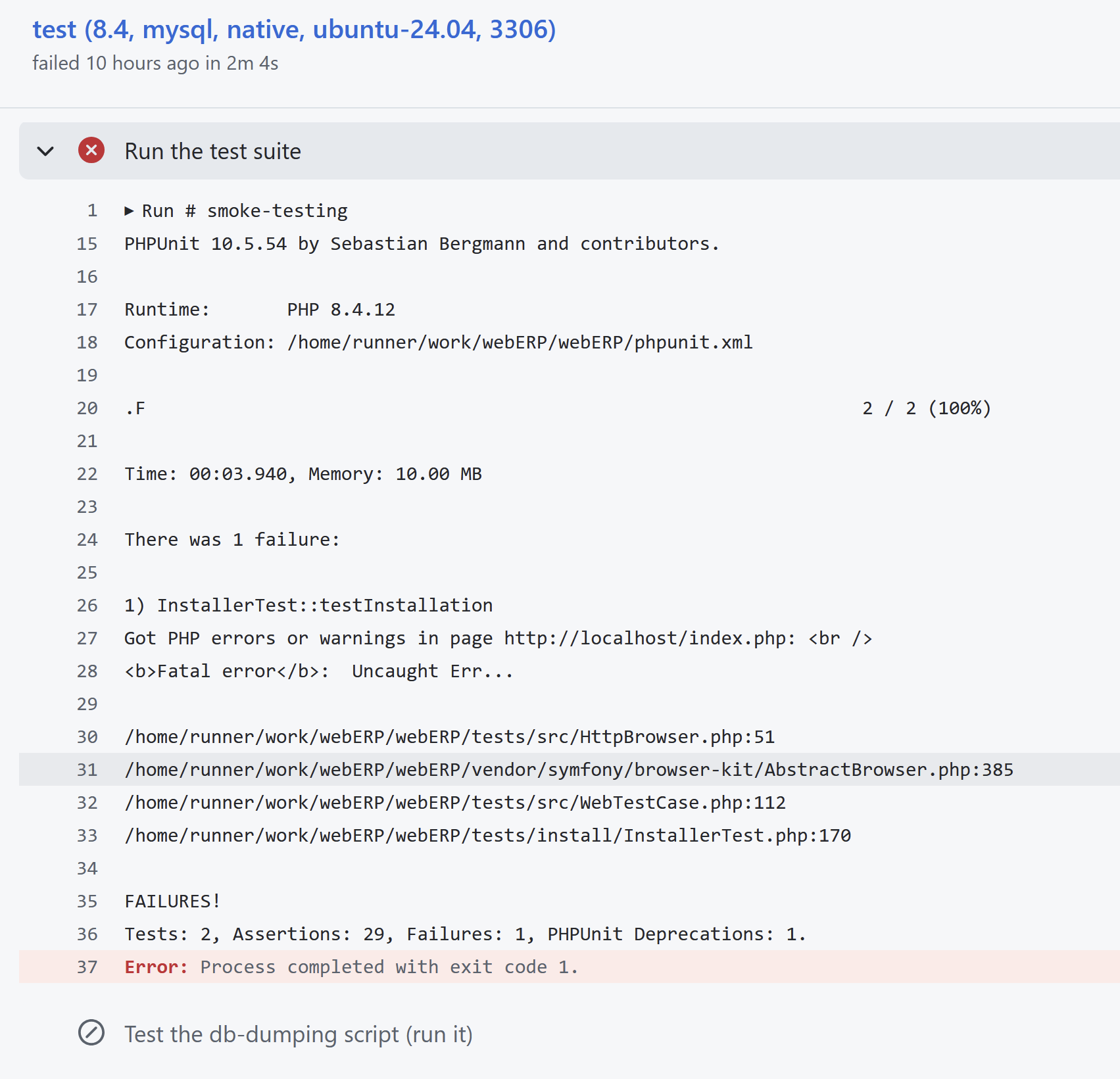
The interesting bit is
InstallerTest::testInstallation Got PHP errors or warnings in page http://localhost/index.php: <br /> <b>Fatal error</b>: Uncaught Err...That tells us that
- the failing test is the one testing the installer (method
testInstallationof classInstallerTest) - the failure happened because a php fatal error was shown when the test code requested the index.php page (this happens at the end of the test in fact, as the installer pages url all start with /install) But it is not very useful, as the error message itself is cut off. So we proceed to the next step…
- the failing test is the one testing the installer (method
-
Expand the “Failure troubleshooting” job step. It is there to give you extra details when tests fail. That’s what you’ll get:
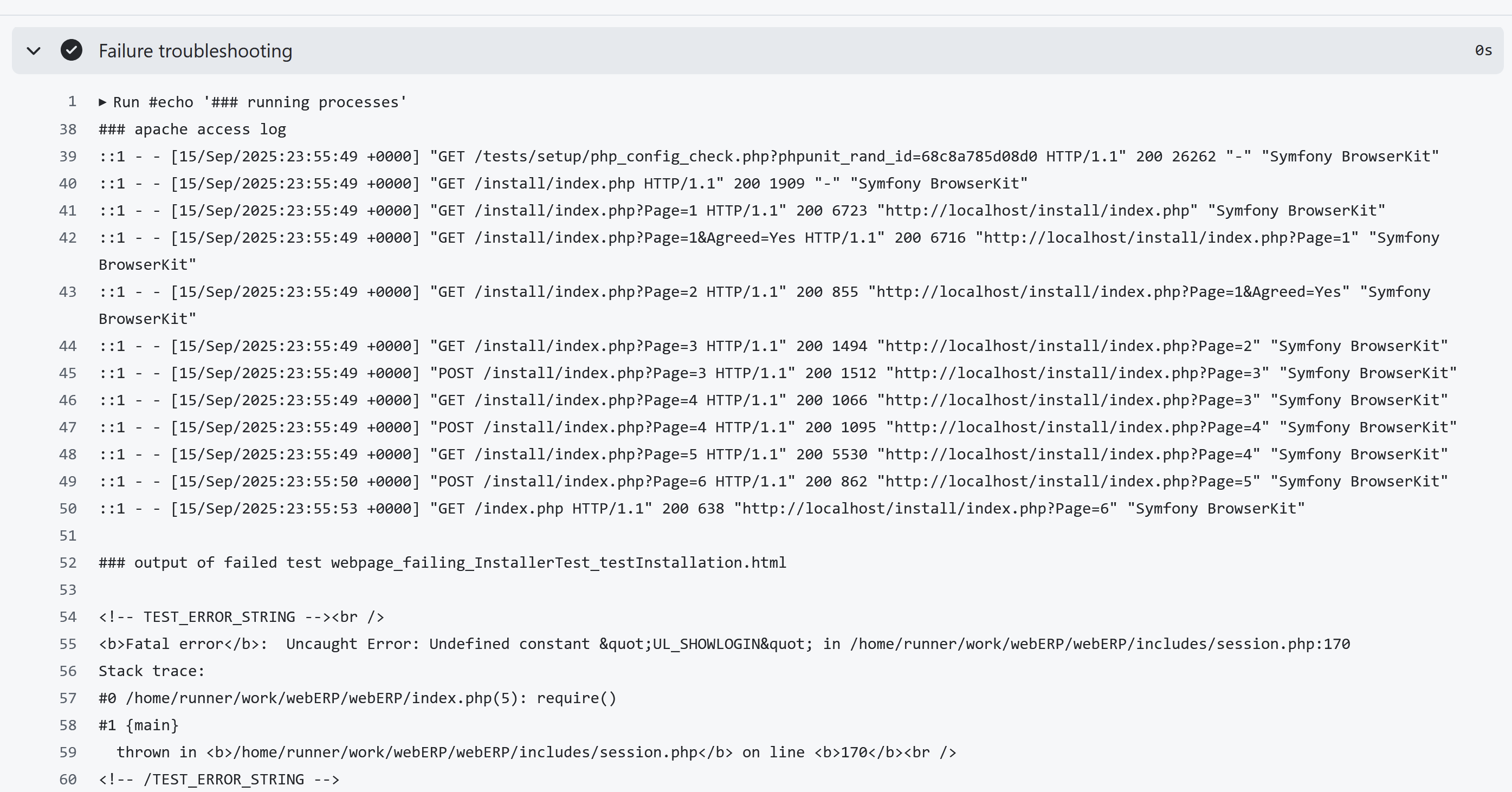
As you can see, there is a list of all the web pages which were requested by the test, and their status code, followed by some HTML. That HTML is the web page which triggered the test failure. In this case, the issue was usage of undefined constant UL_SHOWLOGIN in file session.php, line 170.
You can continue your investigation from there…
Local testing workflow
In order to run tests locally, it is necessary to have already set up:
- a webserver running php and configured to serve the local webERP installation
- a database (currently only mariadb and mysql are supported), which must be reachable from the webserver - note that if you don’t have one set up, you can run one via Docker using the included scripts (see bottom of this page)
- the php command-line tool
composer
NB the test suite is not included if you have downloaded webERP from GutHub as a tarball. You need to have
gotten it via git clone.
There are two main modes of operation:
- run the tests using a dedicated database schema, loaded with demo data
- run the tests using a pre-existing webERP database schema, loaded with data of your choice
IMPORTANT: When in mode 2, the data in the database will be permanently modified by the test suite. DO NOT RUN TESTS AGAINST YOUR PRODUCTION DATABASE!
-
prerequisites: set up the webserver, php, database, and install webERP (see the installation instructions).
Make sure you have the following PHP extensions installed and enabled:
bcmath, calendar, curl, ftp, gd, gettext, iconv, mbstring, mysqli, simplexml, xdebug, xml, zip, zlibMake sure you have the following configuration settings in your
php.ini:auto_prepend_file = (path to weberp install)/tests/setup/config/php/auto_prepend.phpMake sure that the
composercommand is in your PATH. If not, runsudo ./tests/setup/setup_composer.shto have it downloaded and installed in the/usr/local/binfolder -
install the php test dependencies by running, in the webERP root directory, the cli command
./tests/setup/setup_dependencies.shNote: if the
composercommand is not in your path, or is named differently, set the env varCOMPOSERto point to the correct command before running the scriptNB: after running this command, the local
./vendor/directory will be modified. Please do not commit back any of those changes to themasterbranch on GitHub! See step 6 below on how to undo those changes. -
set up the test configuration for your environment: in the webERP root directory, create a file
phpunit.xmlby copyingphpunit.dist.xml, and tweaking it with the correct values<?xml version="1.0" encoding="UTF-8" ?> <phpunit colors="true" cacheResult="false" displayDetailsOnSkippedTests="true" displayDetailsOnPhpunitDeprecations="true"> <php> <env name="TEST_TARGET_PROTOCOL" value="http" /> <env name="TEST_TARGET_HOSTNAME" value="localhost" /> <env name="TEST_TARGET_PORT" value="" /> <env name="TEST_TARGET_BASE_URL" value="/...some path.../webERP/" /> <env name="TEST_DB_TYPE" value="mysqli" /> <env name="TEST_DB_HOSTNAME" value="localhost" /> <env name="TEST_DB_PORT" value="3306" /> <env name="TEST_DB_USER" value="root" /> <env name="TEST_DB_PASSWORD" value="root" /> <env name="TEST_DB_SCHEMA" value="weberp_test" /> <env name="TEST_USER_ACCOUNT" value="admin" /> <env name="TEST_USER_PASSWORD" value="weberp" /> <env name="TEST_USER_EMAIL" value="admin@weberp.org" /> </php> </phpunit>NB: the TEST_DB_SCHEMA might be either an existing, throw-away webERP database, prefilled with data, or the name of a new db schema which will be created on the fly in the next step
NB: if the tests fail with unexpected error messages, check that in the
phpunit.xmlfile you have set values (empty strings are ok) for all the env variables defined in filephpunit.dist.xml- it might be that the example given above here has not been updated to keep track of recent developments… -
(optional) create the test database schema and fill it with demo data: run
./vendor/bin/phpunit tests/install -
run the rest of the test suite
./vendor/bin/phpunit tests/run -
after your testing is complete, to avoid accidentally committing to git the test suite tools installed, run
./tests/setup/setup_dependencies.sh -uNote that failed tests might have left .html files in the project’s root dir. If so, remove them with
rm webpage_failing_*.htmlAlso, if you created a new db schema in step 4 above, feel free to drop it
TODO: command to be developed...
Writing tests
TO BE DOCUMENTED MORE…
Tests cases are written as PHP classes, which extend \PHPUnit\Framework\Testcase, or more commonly one of the customised
test classes present in tests/src.
The test classes should be positioned in tests/run. The name of the file should be the same as the name of the class.
The name of the class should end in Test.
We manage the order of execution of tests via specific naming of the classes/files, eg:
AAA_AnonymousUsersTest.php
...
DDF_SomeScenarioTest.php
Every public method named testSomething is a single test, which wll be executed by PHPUnit.
Those methods should all carry out some work, and check that the result is expected, via using one of the assertSomething
methods, such as:
$data = doSomething(...);
$this->assertTrue($data, 'We expected true as result of this operation');
Please read PHPUnit documentation and tutorials for more information about the available assertion methods. See: https://docs.phpunit.de/en/10.5/
Tests accessing web pages
If the tests are carried out by means of interacting with the app’s web pages as a logged-in user, they should extend
the class LoggedInuserTestcase.
Before the execution of every test method, an admin user will be automatically logged in to the site (and he will be logged out after execution of the test).
To browse pages, use the method $crawler = $this->sendRequest().
To check the contents of the resulting web page, use methods of $crawler.
See the tests in tests/install/InstallerTest.php, method testInstallation, for a more in-depth example.
Tests accessing the database
TO BE DOCUMENTED…
Tips on writing tests
- Use an IDE with support for Composer for resolving the location of class definitions
- Always run
./tests/setup/setup_dependencies.shbefore starting to read/write test code, as you will need the code from PHPUnit and co. to be available on disk - Please use camelCase convention for test code, ie.
$variableinstead of$Variable - Please use phpdoc convention for test code comments
- Please add as much type-hinting as possible. Tests are not meant to be run on php versions less than 8.1
- get acquainted with PHPUnit’s concept of a
dataProviderif you want to run a test multiple times with different parameters
Using the test scripts to run a specific version of a database
In short: you can easily run any version of MySql and MariaDB locally, and use it for webERP.
The prerequisite is to have Docker installer.
The script to run them is tests/setup/setup_db.sh run it with -h for help.
NB: the db container does not stop once started. To stop it, run
`docker ps`
then
`docker stop $id`
where $id is the id of the container, gotten from the 1st command